

Overview (Home Screen)
Cooling
Designed for monitoring the status and operation of the mining device's cooling system. Displays information about fans, their speed, and current status.
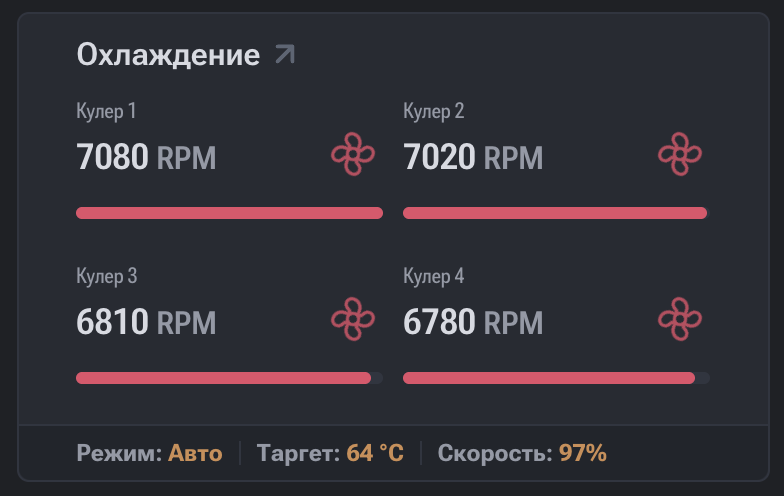
Displayed Parameters
- Fan number — fan identifier (Fan 1, Fan 2, etc.).
- RPM (Revolutions Per Minute) — fan rotation speed in revolutions per minute.
- Fan Duty (%) — fan load level in percentage.
- Status — current fan status:
- OK / Active — the fan is operating correctly;
- Error — the fan is unresponsive or operating incorrectly;
- Stopped / Disabled — the fan is stopped or disabled (if supported).
Data Interpretation
- Stable RPM and Fan Duty values indicate correct operation of the cooling system.
- Absence of RPM or an Error status means the system is not receiving correct data from the fan.
- Increased Fan Duty at a stable temperature may indicate an aggressive cooling profile.
Practical Significance
The cooling section is used for:
- Monitoring cooling efficiency;
- Preventing ASIC device overheating;
- Diagnosing faulty or disconnected fans;
- Analyzing the cooling system's reaction to temperature changes.
Impact on Device Operation
Incorrect fan operation can lead to:
- Increased chip temperature;
- Reduced performance (throttling);
- Automatic mining shutdown to protect the hardware.
Recommended Actions for Fan Error
If an Error status is detected, it is recommended to:
- Check the physical connection of the fan.
- Ensure there is no mechanical damage.
- Check cables and connectors.
- Restart the device.
- Replace the fan in case of hardware malfunction.
Cooling
Designed for monitoring the status and operation of the mining device's cooling system. Displays information about fans, their speed, and current status.
Boards
This section is designed for monitoring the status and operating parameters of the mining device's hash boards. Each board contains a set of ASIC chips and functions as a separate computing module.