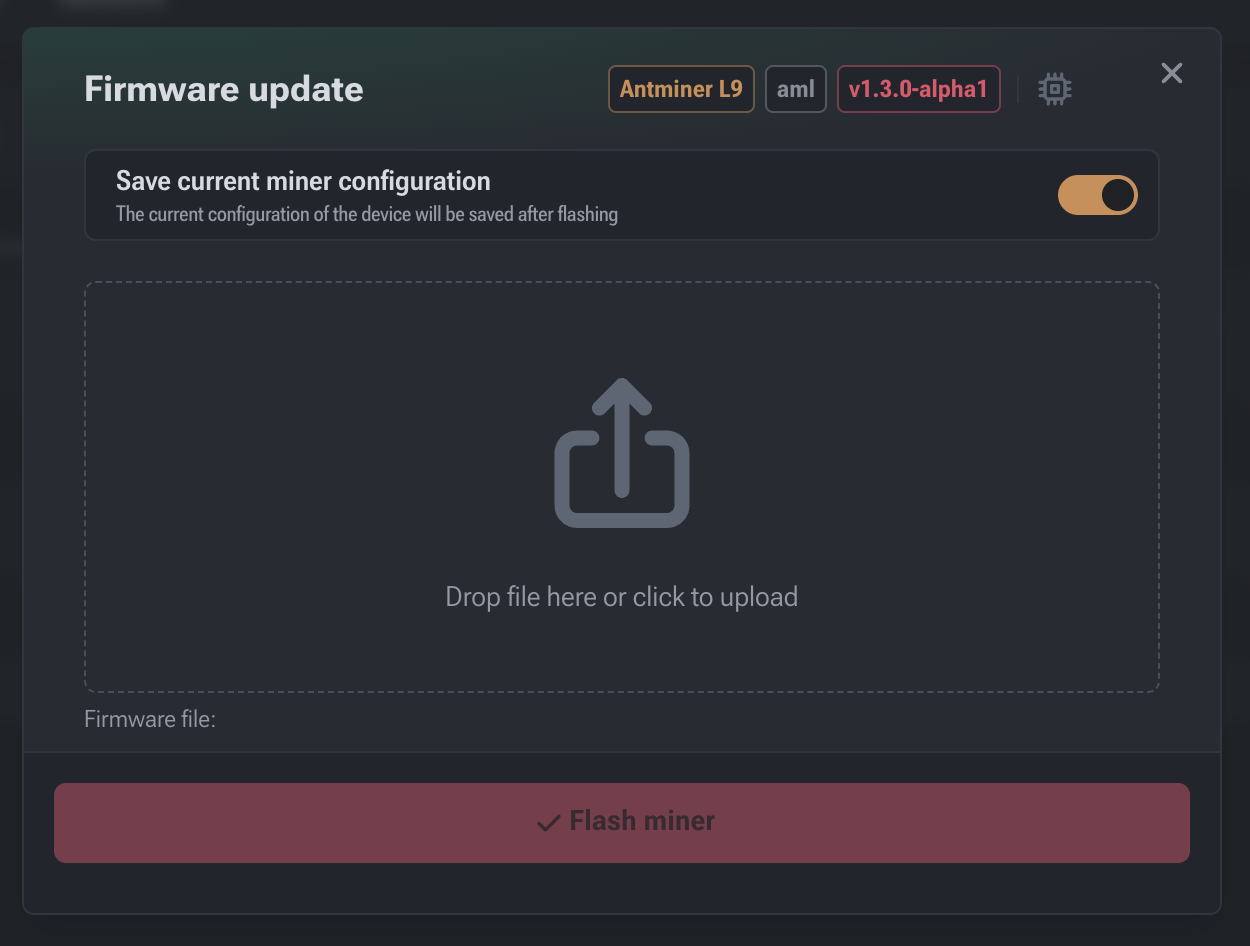

Firmware Update
This section is intended for installing new software versions and expanding the miner's functionality. Firmware updates allow optimizing hash rate, improving energy efficiency, and gaining access to new management tools.
Accessing the Section
To open the firmware update window:
- Click the Firmware update button at the bottom of the left sidebar.
- If the button is not visible, open the “burger menu” (three lines) to expand the section list and select the corresponding item.
Main Functions and Options
The window provides the following elements:
- Save current miner configuration: Toggle to save current settings (pools, overclock profiles, etc.) after the firmware update.
Important: If this option is disabled, the device will revert to the default settings for this firmware version.
- Version Information: Displays the current device model (e.g., Antminer S19), chip architecture, and installed software version (e.g., v1.2.2-alpha) at the top of the window.
Update Process
The interface supports two methods for uploading the firmware file:
- Drag-and-drop: Simply drag the firmware file from your computer into the cloud icon area.
- Manual selection: Click the upload area (“Drop file here or click to upload”) to open the file explorer and select the desired file from your disk.
Completing the Operation: Once the file is selected and recognized by the system, the Flash miner button will become active. Click it to start the flashing process.
Warning! Do not turn off the device or interrupt the network connection during the update. This may result in equipment failure.